Whitelisting Words
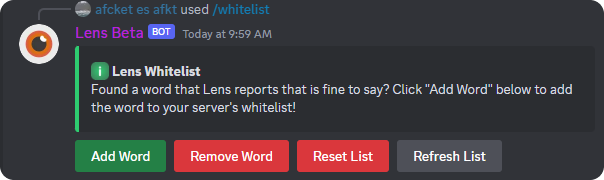
Have you come across a word that the bot reports but you think it's fine to say? The whitelist command fixes that by allowing you to add any word to a list so it is no longer detected by the bot.
Adding Words
When you find a word to whitelist, you can click the Add Word button and a menu will pop up (shown below) asking for the word that you want to add.
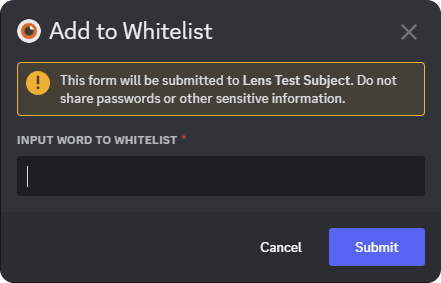
Have a bunch of words that you want to add? Separate the the words with a comma in the pop up menu! Ex: badword,badword2,badword3
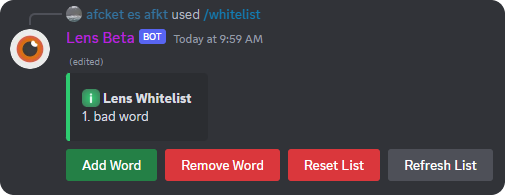
Once you have added a word to the whitelist you can click the Refresh List button and it will show you a list of the words currently in the whitelist.
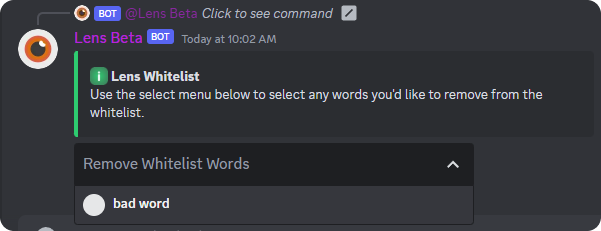
Change your mind and want to remove a word? you can click the Remove Word button and the bot will respond with a message that has a dropdown (shown below). The dropdown menu will have all of the words currently in the whitelist.
What Now?
Now that you have setup your whitelist, the only thing left to do is create an autopunish rule with the autopunish command! This allows you to automagically punish users for going past a certain rating on a filter.
As always, if the bot is not detecting messages/not working, join the support server and ask for help!